Getting involved
Some classes
Java Emitter Templates (JET or JETemplate) are the starting point if
you want to venture into code generation. It is also the easiest way to
generate code. You can create your own templates. For how to do this
please consult the articles provided in the reference
section. The template can be added via the path on your system. If your
template uses its own model or needs other helper classes you will have
to supply them together with the template in a plugin extending the
extension point ch.sahits.codegen.java.jettemplate
There are four categories of generators. Every generator must
implement the interface IBaseGenerator.
Each Generator has its own specific interface that needs to be
implemented. For some classes there are also abstract classes that already
implement a large part of the needed functionality.
For JETemplate with AST improvement your
generator has to implement the interface IJETASTGenerator
The abstract class AbstractJETASTGenerator
provides a well founded basis. You have to implement the three methods:
createJetGenerator() that provides the JETGateway for generation from
the template, setBaseClass(String) that initializes the with JET
generated base class and generateASTCode() that encapsules everything
you want to generate with AST.
To generate a JETemplate your generator must
implement the interfaces IGenerator and IJetCodeGenerator.
Here the abstract class AbstractJETTemplateGenerator
encapsueles almost everything. You have to fill in the methods
addImports() for adding the needed import statements and
generateTemplate() for the actual template generation.
To generate with AST from scratch you need to have
a deeper knowledge of the inner working of AST. This can be gained
through the resources in the further reading section.
A generator must implement the interfaces IPureASTGenerator.
Since almost everything is specific for this type of generator and there is no abstract class you have to implement it.
To generate a JETemplate with AST improvement your generator must implement the interfaces
IASTGenerator,
IJetCodeGenerator and
IGeneratorInitializer.
The class ASTGenerator can be used as a base class.
For a Reference Implementation your generator class must implement the interface
IReferenceImpleCaller and may be a subclass of
AbstractReferenceImplCaller. The reference
implementation itself must implement IReferenceImplementation.
For further details see the reference implementation documentation.
Getting the source
If you decide to get involved you want to check out the project.
Actually the project consists of four parts that you need to check out.
Go to File -> Import -> Other -> Checkout Project from SVN.
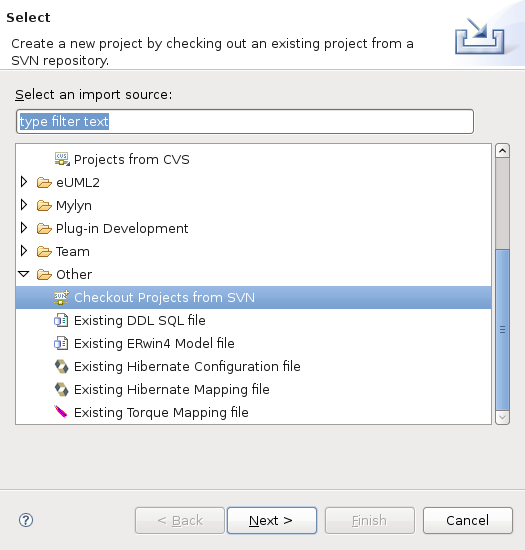
Select Create new repository location.
Supply the URL https://codegenjava.svn.sourceforge.net. Open the tree
and select the folder plugin to check out. Repeat this process (now you
can select the repository from the list)
The easiest way to retrieve the code is with a script that is available
for the
Windows and
Unix/Linux platforms.
The following is a list of plugins that are part of this project:
- ch.sahits.codegen: Code generation stuff for non java files
- ch.sahits.codegen.core: Core functionality
- ch.sahits.codegen.help: Help stuff of the plugin
- ch.sahits.codegen.java: The wizard itself
- ch.sahits.codegen.java.gui: Extension for generating a user interface
- ch.sahits.codegen.oracle: Connector to an oracle database (10.0.1)
- ch.sathis.codegen.mysql: Database stuff for MySQL (5.0)
- ch.sahits.codegen.microsoft: Database stuff for SQL Server (2000)
- ch.sahits.codegen.test: Test classes from all plugins
- ch.sahits.model: General input/data models
- ch.sahits.codegen.sql: SQL insert script generator
- ch.sahits.codegen.javaexamples: further examples
- jdom: org.jdom library
- mysql: com.mysql driver library
- com.oracle: Oracle driver library
- com.microsoft: SQL Server driver library
- sahits: The ch.sahits.util library
When you come to the conlusion to contribute to the project don't
hesitate to contact me to gain
committer rights.
Further reading
Create more -- better -- code in Eclipse with JET A
good tutorial from IBM (Aug 2006)
JET Tutorial Part 1 (Introduction to JET) and JET Tutorial Part 2 (Write Code that Writes Code)
(Jul 2003) illustrating the way from a JET project to a plug-in.
How to create custom XPATH Function?
How to create custom tag?
JDT API Documentation
Abstract Syntax Tree Article
Manipulating Java Code
JDT fundamentals
YAAT - Yet another AST
tutorial
AST
Javadoc
JDom
JDom Tutorial on JavaWorld
Database
JDBC Connection examples
Oracle
Oracle Data Type (versions 7 - 9) and Oracle
Datatypes & Subtypes (version 11)
Create Table Syntax (version 10.2)
Create Index Syntax (version 10.2)
Metadata queries
MySQL
Create Syntax for table for MySQL 5.0
Create Syntax for index for MySQL 5.0
SQL Server (Microsoft)
Information Schema for MS Server 2000
Create Syntax for tables for MS SQL Server 2000
Create Syntax for tables for SQL Server 2000 (by Microsoft)
Create Syntax for index for SQL Server 2000 (by Microsoft)
Data Type definition
This Project is hosted at:

Last modified: